|
Adobe
Lightroom
Software! |
You have
probably heard the expression "you cannot make a silk purse out of a
sows ear" and it is well used in the photographic circles as meaning you
cannot take a completely failed, flawed image and turn it into a
masterpiece.
With my
limited experience, I had a bash...........with the aspiration of making
one of my REJECTS a little bit more presentable.
Adobe
Lightroom - Post Processing
I used one of my Canon 5D
MK1 RAW files which was a 'heavily flawed' image that I had captured during a visit
with my girlfriend to Chatsworth House in the Peak District of England.
On that occasion the weather was inclement, the sky was grey and it was
a walk in the grounds rather than any serious photography.
This 1st
image is the camera RAW straight out of the camera (shot in faithful
mode) converted to jpeg and re-sized for the web.........the flaws in
the light balance between the foreground and the sky are fairly obvious.
It
was taken at ISO:200, aperture f11 and shutter at 1/200secs. Although
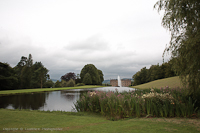 this camera RAW file is drab to look at, it has a great deal of
flexibility..........after all the camera can produce RAW files and also
jpegs of various levels of contrast, saturation, sharpness etc, to suit
the individual when the appropriate camera menu settings are selected
prior to the shot being taken.
It is the same with Lightroom software, you can load the camera RAW
file and LR will allow you to then select any setting using the LR 5D
camera profile to mimic the 5D camera menu but with additional post
processing power to expand upon it. this camera RAW file is drab to look at, it has a great deal of
flexibility..........after all the camera can produce RAW files and also
jpegs of various levels of contrast, saturation, sharpness etc, to suit
the individual when the appropriate camera menu settings are selected
prior to the shot being taken.
It is the same with Lightroom software, you can load the camera RAW
file and LR will allow you to then select any setting using the LR 5D
camera profile to mimic the 5D camera menu but with additional post
processing power to expand upon it.
With the camera RAW image, I would normally apply contrast, saturation and
adjust very slightly the exposure if required. The end result would
normally be reasonable and
 I would keep this 2nd image more for the memory
than as a quality result. I tend to use Canon's DPP Software which would
deliver a reasonable converted jpeg for my web but on this
occasion I used Lightroom and made similar adjustments for the jpeg conversion. I would keep this 2nd image more for the memory
than as a quality result. I tend to use Canon's DPP Software which would
deliver a reasonable converted jpeg for my web but on this
occasion I used Lightroom and made similar adjustments for the jpeg conversion.
This
2nd image is the end result but there is still the problem of the sky and had the original image been
captured using a '2 stop' gray graduated filter, it would have been
better. This 2nd image still lacks 'pop' and the flowers in the
forefront do not have the clarity and colour that you see in those great landscape
shots.
The 3rd image is the 2nd image taken to the next level in Lightroom
where I have added a graduated blue filter,
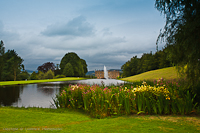 made various changes to
sections of the image using the adjustment brush and cropped it for
effect. made various changes to
sections of the image using the adjustment brush and cropped it for
effect.
It
demonstrates where you can improve the light and the 'pop' and I think
the flowers in the foreground are all together much better?
I
made further changes to image 3 to create image 3-2
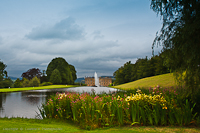 and cropped it even
further.
I think this extra cropped image delivers more emphasis on the flowers
in the foreground but the bush is a little heavy on the right side of
the scene. Unfortunately if you were into serious printing, this extra cropped image would require to be
expanded in pixel size for 'enlarged prints' using image expansion software. and cropped it even
further.
I think this extra cropped image delivers more emphasis on the flowers
in the foreground but the bush is a little heavy on the right side of
the scene. Unfortunately if you were into serious printing, this extra cropped image would require to be
expanded in pixel size for 'enlarged prints' using image expansion software.
I am
sure that if I studied Lightroom and with a lot more 'hands
on' experience, especially using the tutorials, I would be able to 'do more justice' to the 3rd images,
in particular the sky and make it more pleasing and perhaps more
natural. However it lets you see what Adobe Lightroom is capable of in
post processing..............I am fairly sure that it is the software of
choice for most professional landscape photographers or its software variants for
those who shoot medium format cameras.
The last image is
 stepping over the boundary and going a stage to
far by 'warming' and replacing the blue sky with a pinkish one. I
don't think I like it, in fact I am not sure that I like any of the
images? stepping over the boundary and going a stage to
far by 'warming' and replacing the blue sky with a pinkish one. I
don't think I like it, in fact I am not sure that I like any of the
images?
The
exercise was very interesting and not 'half bad' an outcome. I do
somehow feel that I have cheated. However it clearly demonstrates the
power of Adobe Lightroom in the hands of a novice.
For those who have taken 'Family Pictures' that are basically sharp with
great content but have been taken badly where the lighting is out of the
correct dynamic range balance or there is to much 'noise' (similar to
heavy grain in film images) then perhaps Adobe Lightroom Software
would provide the solution to clean up those images that stimulate those
treasured memories?
If you have enjoyed this article - please donate to my
Charity of Choice -
The Sick Kids
Richard Lawrence
Scotland
United Kingdom |